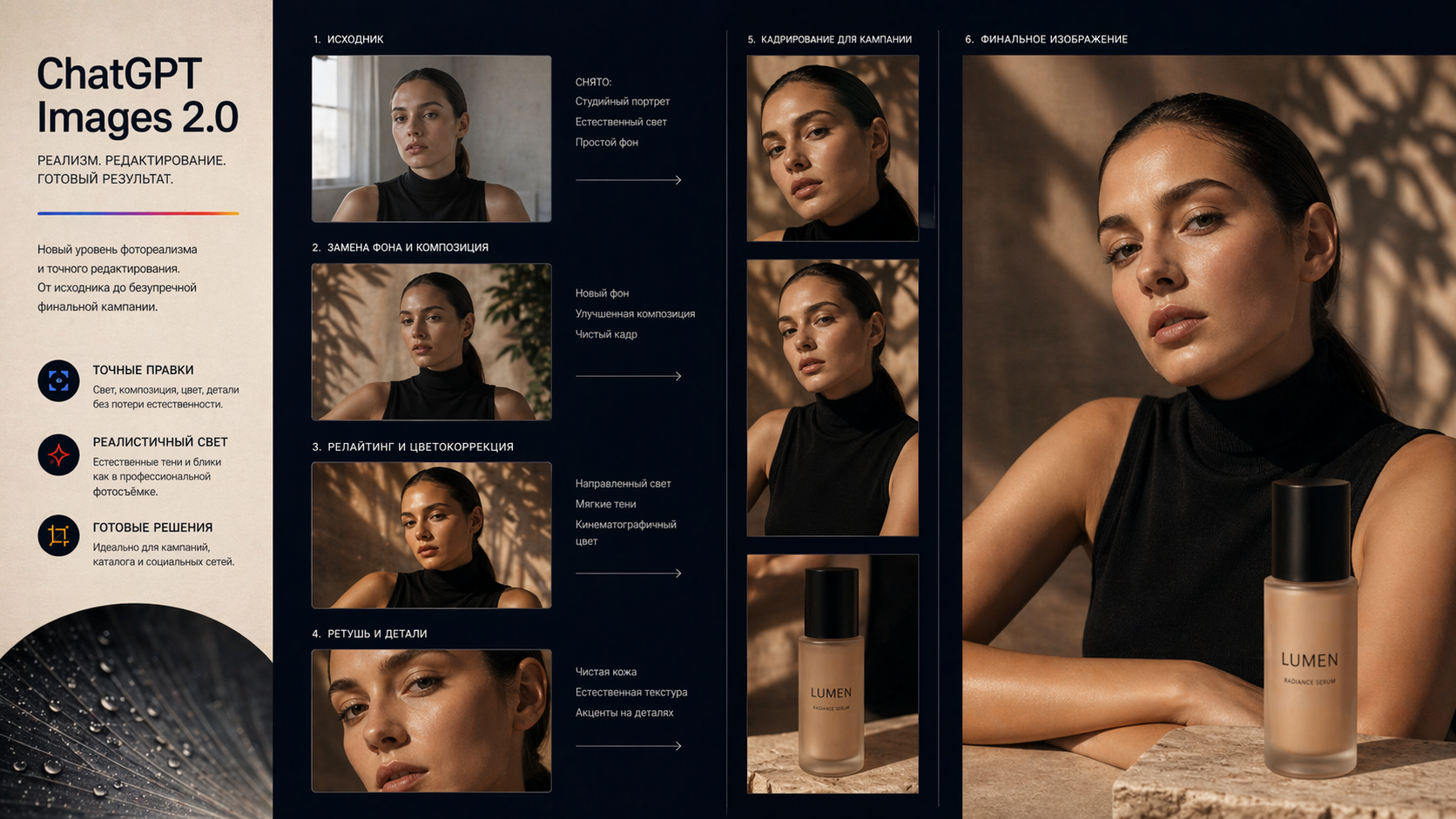
Retouching into a commercial imageChatGPT Images 2.0
Step-by-step refinement of an existing portrait: light, background, composition, and retouching. The base image stays recognizable through each step.
Improve an existing image without rebuilding it from scratch.
ChatGPT Images 2.0Retouching into a commercial image
Step-by-step refinement of an existing portrait: light, background, composition, and retouching. The base image stays recognizable through each step.
An AI image editor is useful when you already have a source image and need to improve it: change background, light, style, or product presentation. The edit is described in plain language, without masks, layers, or manual retouching.
In Givon AI, editing lives next to image generation and video. The edited result can be saved to the library, reused as a reference, or animated into a video scene inside the same project.
What you can do
Replace background and light
Move a product to a studio background, add soft shadow, or change mood without touching the object.
Prepare ad visuals
Adapt a frame for a product card, banner, or vertical social format with room for copy.
Lock important details
Explicitly say what must not change: product, face, logo, or composition, then review the result.
Keep a series consistent
Return to useful library materials so each image does not start from zero.
If your task is different
This page covers precise edits to existing images. New image creation and motion have their own workflows.
A real Givon AI case: the source image is improved with a text instruction instead of regenerated from zero.
Step-by-step refinement of an existing portrait: light, background, composition, and retouching. The base image stays recognizable through each step.
A prompt should describe content: subject, action, camera, light, and style. Duration, aspect ratio, and resolution are generation settings, not prompt text.
Weak
Make this photo better.
Better
Keep the product shape, logo, and packaging unchanged. Replace the background with a light studio setup, add a soft shadow, and make the frame cleaner for a product card and social ad.
Dedicated catalog models handle precise changes. If one model changes too much, try the same edit in another.
Careful edits and strong handling of text inside images.
Photorealistic retouching and background replacement without losing the object.
Stylization and atmospheric edits with a generous reference budget.
A Pro option for complex scenes with many details to preserve.
Pricing comes from the current catalog and is shown before launch. Mode, duration, resolution, and audio can change the final cost.
Choose a photo that is already close to the goal: product, portrait, illustration, or strong generated frame.
Describe a specific change, such as background, light, or mood, and list what must stay untouched.
Look beyond beauty: check product shape, face, object edges, and readability.
Add the best version to the library as a final, reference, or base for the next edit.
Use the image as a reference, animate it into video, or place it into a future scene.
Faces, products, logos, and text must be checked manually in each version.
Adapt a source image for an ad, social post, or visual test.
Refine the style, mood, and presentation of a character for posts or video.
Prepare visuals for ads, Reels, presentations, and client concepts.
Change background, light, or mood for a campaign without reshooting the product.
If a frame contains something that cannot be replaced by a random generation - a product, face, location, or approved composition - start with editing. It keeps the base and changes only what blocks the task.
If precision is not critical and you are looking for a direction, start with photo generation. Once a strong frame appears, save it and finish it through edits.
When the frame is already close, only the blocking detail changes while composition and subject stay in place.
ChatGPT Images, Nano Banana, Seedream, and Wan edit differently. If one changes too much, try the same instruction in another.
You do not need masks or layers. Describe the change and state what should remain unchanged.
The result is saved to the library, reused as a reference, or sent into video without file transfers.
Quality depends on the task, source materials, and number of attempts. Here is what to account for before publishing.
Brand marks, labels, and legal text should be checked manually in every edited version.
The more changes you ask for at once, the higher the risk of touching something else. Go step by step.
Add brand colors, backgrounds, and packaging as sources, then compare each version with the original.
If the photo is blurry or the subject is unclear, first find or generate a cleaner source.
Object edges, texture, and tiny details can change. Choose variants by accuracy, not only impact.
Use editing when you must preserve a specific product, face, location, logo, or approved composition. Generation from scratch draws a new image every time.
ChatGPT Images, Nano Banana, Seedream, and Wan. Each edits differently, so if one model changes too much, try the same task in another.
State that clearly in the prompt and use a high-quality source. After the edit, still review shape, packaging, logo, and text manually.
Check faces, hands, logos, packaging, text, proportions, object edges, and the requirements of the channel where the image will be used.
Yes. Save the edited frame to the library and animate it on the Image to video page. It becomes the first frame of a video scene.
Registration does not require a card. Starter tokens cover the first edits; after that you can use a plan or buy more tokens. Unused tokens do not expire.
No card required. Upload a source image and try the first edit. After the first result, save the asset and keep working in the same project.
Try AI editing